How it works

Drop in your audio
1

Drop in your audio

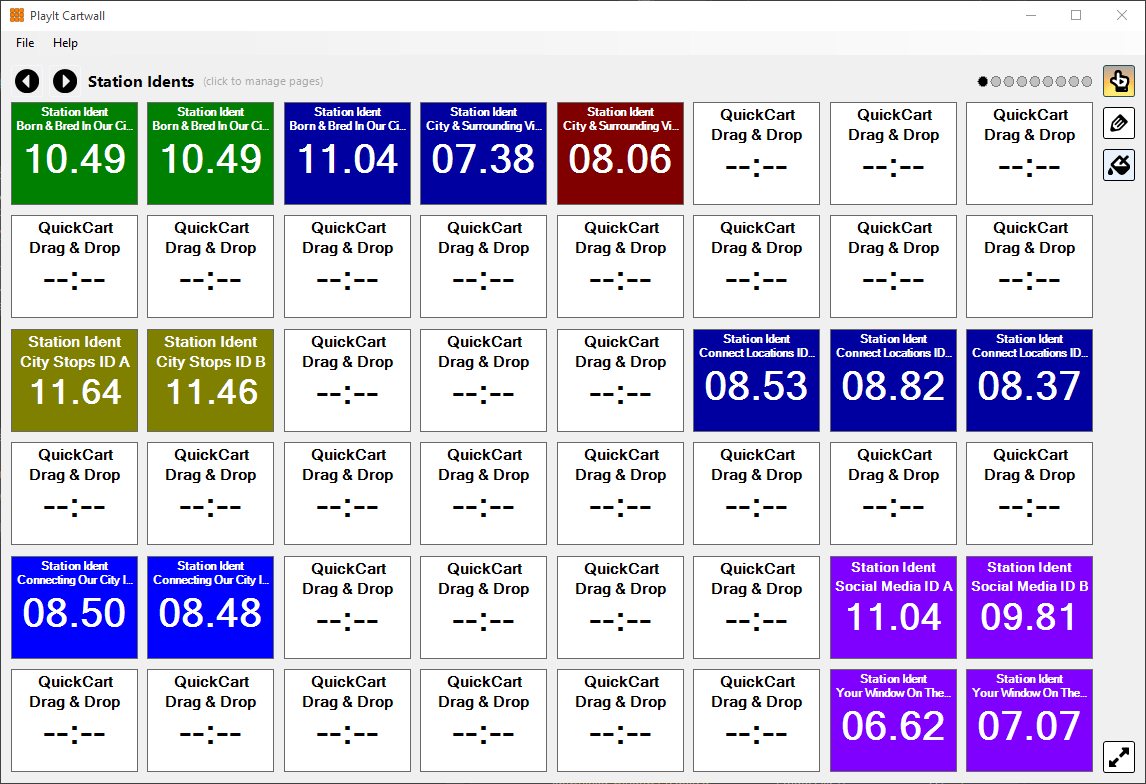
Drag audio files straight from Windows onto a cart, then set its name, colour and looping.

Organise it into pages
2

Organise it into pages

Create as many named pages as you need, so each presenter or show has its own set of carts.

Play with one touch
3

Play with one touch

Fire carts from a touchscreen, the mouse or keyboard shortcuts, out of any sound card including ASIO.

Features

View all features

One-touch audio players
Play from a range of popular audio formats
including WAV, MP3, WMA, MP4 and FLAC
Drag and drop audio files
from the file system for convenient loading of tracks
Arrange carts in a grid with a customisable number of rows and columns
Configure an unlimited number of named pages
to organise audio into categories
Further classify carts with individual colours per cart
Operate players and controls using keyboard commands
Loop carts
useful for background music beds
Supports any sound card available to Windows
including professional ASIO devices
Compatible with touchscreens

Screenshots

What are broadcasters saying about PlayIt Cartwall?

1,003 testimonials from radio presenters, station managers and engineers. Read them all →

I like color coding; it works great with our touchscreen, the ease of use, and the ability to mark in/out (great for SFX tracks with multiple options on a single track), and the fact that the show file is just there every time it's loaded.
December 2025
Easy to find the right jingle, and having the cartwall control panel separate from the music player, and yet you still have the option to play jingles/intros on the music player itself.
November 2025
I like the SOLO option. It means traffic jingle in plays and hands over to traffic out. Perfect!!! Well done. I also like the fact that I can pre-determine how many rows and columns, and the automatic store of carts on exiting the programme.
July 2025
It's very user friendly. It only takes minutes to train others to use it. Being able to layer the sounds is also a huge plus. With a previous system, one sound had to end for another to begin.
October 2025
Very utilitarian, responsive, versatile, intuitive. The audio flexibility is terrific, and the grid functions are a great touch. I use PlayIt Cartwall on a touch-screen monitor and it works perfectly.
November 2025
I love using the Cartwall. I have more than 20 pages of sung jingles.
November 2025
After using it for many years on various stations & projects, it's always been user friendly. Teaching novices new to radio find it very easy to understand and use.
November 2025
Easy to use. It has differing grids for different shows.
August 2026
Simple - color idents - editing capability - multiple pages. An almost exact duplicate of my old station cart deck but with more options... excellent software.
December 2024
I love that it's easy to use, easy to customize, and my absolute favorite feature is the fade in/out for the tracks.
October 2025
I like its resizability, possibility of setting the starting point of the sound, big buttons and digits, easy way to check the remaining time during playback.
June 2025
I like the practicality and the ease of handling the application; it is very simple and intuitive. The integration with the radio streaming platform was very easy and simple.
May 2026

Put your jingles one touch away

PlayIt Cartwall is free to download and use.

Windows is required to install PlayIt Cartwall. Download Anyway
Version 2.03 (Build 1089) for Windows · documentation · FAQs

Contact

PlayIt Software is based in the heart of Cambridge, England, United Kingdom.
You can get in touch with us by the following methods:

Send us a message

Office
PlayIt Software Ltd
184 Cambridge Science Park
Milton Road
Cambridge
CB4 0GA
United Kingdom
Email icon Email icon
Sales enquiries (email)
Headset icon Headet icon
Sales enquiries (talk)
Facebook icon Facebook icon
Technical support (Facebook group)
Facebook icon Facebook icon
Technical support (email)
Eligible users only. Check eligibility >
Facebook icon Facebook icon
Facebook page
Facebook icon Facebook icon
YouTube channel